概要
ESP32、ESP32S3には SDカードのとの接続方法に SPIとは別に SD_MMC 接続が有ります。 今回は SD_MMC接続に付いて説明します。
SD_MMCとは
SD_MMCとは、SDカードをより高速に、かつ効率的に読み書きするためのインターフェースです。 主な特徴は以下の通り。
- 高速転送:
- SPI通信に対し動作クロックが速く、複数のデータ線を使うため読み書きの速度が速い。
-
項目 SD_MMC (4-bit) SD_MMC (1-bit) SPIモード データ線数 4本 1本 1本 (MOSI/MISO) 使用ピン数 6本 3本 4本 転送速度 最高速 (約10-20MB/s) 中速 (約4-8MB/s) 低速 (約1-2MB/s) ピン割り当て 固定 (基本変更不可) 固定 (基本変更不可) 自由 (任意のGPIO) 対応モデル 無印, S3, P4など 無印, S3, P4など 全モデル (C3, C6, 8266含) 動作周波数 約40MHz 約40MHz 約8MHz ライブラリ SD_MMC.hSD_MMC.hSD.h - ハードウェア支援:
- ESP32は SD_MMC コントローラーを内蔵。CPUの負荷を抑えながら安定した通信が可能。
主な関数
*初期化・システム管理
| 関数名 | 引数 | 戻り値 | 説明 |
begin | mountpoint, mode1bit, format_if_mount_failed | bool | SDカードをマウント(初期化)。 1bitモードか4bitモードかを選択可能。 |
end | なし | なし | マウントを解除し、リソースを解放します。 |
cardType | なし | sdcard_type_t | カードの種類(SDHC, SDXC, MMC等) を返します。 |
totalBytes | なし | uint64_t | SDカードの総容量(バイト単位) を返します。 |
usedBytes | なし | uint64_t | 使用中の容量(バイト単位)を返します。 |
*ファイル・ディレクトリ操作
| 関数名 | 引数 | 戻り値 | 説明 |
open | path, mode | File | ファイルまたはディレクトリを開きます。modeにはFILE_READ, FILE_WRITE, FILE_APPEND を指定します。 |
exists | path | bool | 指定したパスにファイルやディレクトリが 存在するか確認します。 |
mkdir | path | bool | 新しいディレクトリを作成します。 |
remove | path | bool | 指定したファイルを削除します。 |
rmdir | path | bool | 指定したディレクトリを削除します。 |
rename | pathFrom, pathTo | bool | ファイル名やディレクトリ名を変更します。 |
*Fileオブジェクトの操作
| 関数名 | 引数 | 戻り値 | 説明 |
print / println | data | size_t | ファイルに文字列や数値を書き込みます。 |
write | buf, size | size_t | バイナリデータをファイルに書き込みます。 |
read | なし / buf, size | int / size_t | データを1バイト、 または指定サイズ分読み込みます。 |
available | なし | int | 読み取り可能な残りのバイト数を返します。 |
seek | pos | bool | ファイル内の読み書き位置(ポインタ) を指定位置に移動します。 |
size | なし | uint32_t | そのファイルのサイズ(バイト)を返します。 |
close | なし | なし | ファイルを閉じ、変更を確定させます。 |
機能確認
配線
配線前に、SPIとSD_MMC で実際に使用するピンを下記に比較。SD_MMCに関し、 ESP32はデフォルトで固定。 ESP32S3にはデフォルトが有りません。ユーザが指定します。ESP32S3の方が使い勝手が良い。
| 信号名 | SD_MMC (4-bit) | SD_MMC (1-bit) | SPI (標準VSPI) | 備考 |
| CLK / SCK | GPIO 14 | GPIO 14 | GPIO 18 | クロック |
| CMD / MOSI | GPIO 15 | GPIO 15 | GPIO 23 | コマンド / データ送信 |
| D0 / MISO | GPIO 2 | GPIO 2 | GPIO 19 | データ線0 / データ受信 |
| D3 / CS | GPIO 13 | 解放 | GPIO 5 | データ線3 / チップセレクト |
| D1 | GPIO 4 | 解放 | 解放 | |
| D2 | GPIO 12 | 解放 | 解放 |
下記はESP32,S3とMMC(1-Line)の接続例です。各信号線は10KΩ位でPullupする必要が有ります。
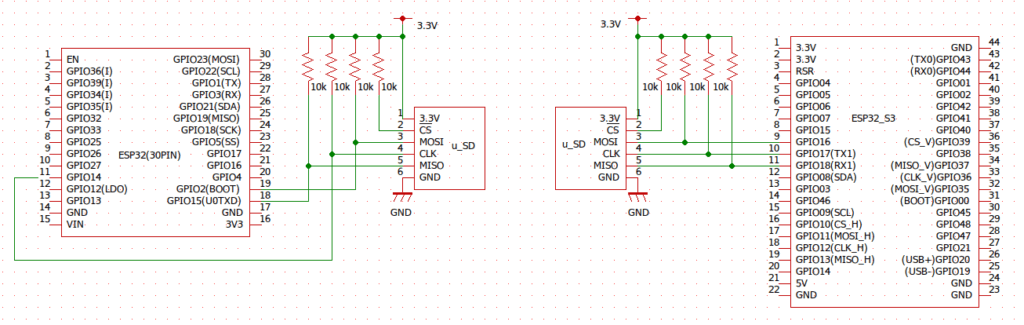
- GPIO2には注意が必要
- スケッチを書き込む時、このピンをLowにする必要が有る。
- SD_MMCではHighにしなければいけない。
- 10kΩの抵抗が有れば大抵動作する様ですが、動かない事もある様です。
- "SD_MMC library" ではスケッチ書き込みの前後でスイッチ等でHigh/Lowを切り替えを推奨。
- 配線の長さとプルアップ抵抗に注意
- 転送速度が速いのでSPIより更に配線の長さに注意が必要です。
- SPIの時が約20cmを目安にしていました。それ以下が理想。
- プルアップ抵抗が無いと誤動作します。確実に入れて下さい。
- CSは抵抗でプルアップすれば良い。
- MMC(1-Line)で実質必要な信号ラインは3本。
- SPIが4本なので、1本少ない。意外とこれが大きなメリット。
サンプルプログラム
SD_MMCのサンプルプログラムは スケッチ例ー>SD_MMCー>SDMMC_Testに有ります。 回路が、ESP32S3 の MMC(1-Line) なのでサンプルスケッチの以下を変更しています。
- 信号ラインは上の配線図に合わせて配線しています。(スケッチの215から217行参照)
- #define mmc_CMD: 18
#define mmc_CLK: 17
#define mmc_D0: 16
- #define mmc_CMD: 18
- 236行 mmc_D0ピンは High 保持なので、立ち上がり直後にセット。
- 237行 SD_MMC.setPins(mmc_CLK, mmc_CMD, mmc_D0);で各信号線を設定。
- 238行 SD_MMC.begin("/sdmmc", true, false, SDMMC_FREQ, MAX_FILE)で下記を設定。
-
第1〜5引数 役割 設定のポイント "/sdmmc"マウントポイント ファイルシステムのルート名です。 /sdcardや/sdなど、コード内でファイルを
指定する際のプレフィックスになります。true1ビットモード有効化 trueで1ビット(D0のみ)通信falseで4ビット(D0-D3)通信。false自動フォーマット trueにするとマウント失敗時にSDカードを
強制初期化します。データ保護のため通常は
false推奨です。SDMMC_FREQ動作周波数 (kHz) 通信スピードを指定します。デフォルトは
通常20000(20MHz) です。高速なカードなら
40000(40MHz)などに上げられますが、
ノイズに弱くなります。MAX_FILE同時オープンファイル数 同時に開くファイル数を指定。
デフォルトは5程度。
変更点は以上です。
/*
 * pin 1 - D2                |  Micro SD card     |
 * pin 2 - D3                |                   /
 * pin 3 - CMD               |                  |__
 * pin 4 - VDD (3.3V)        |                    |
 * pin 5 - CLK               | 8 7 6 5 4 3 2 1   /
 * pin 6 - VSS (GND)         | ▄ ▄ ▄ ▄ ▄ ▄ ▄ ▄  /
 * pin 7 - D0                | ▀ ▀ █ ▀ █ ▀ ▀ ▀ |
 * pin 8 - D1                |_________________|
 *                             ║ ║ ║ ║ ║ ║ ║ ║
 *                     ╔═══════╝ ║ ║ ║ ║ ║ ║ ╚═════════╗
 *                     ║         ║ ║ ║ ║ ║ ╚══════╗    ║
 *                     ║   ╔═════╝ ║ ║ ║ ╚═════╗  ║    ║
 * Connections for     ║   ║   ╔═══╩═║═║═══╗   ║  ║    ║
 * full-sized          ║   ║   ║   ╔═╝ ║   ║   ║  ║    ║
 * SD card             ║   ║   ║   ║   ║   ║   ║  ║    ║
 * ESP32-P4 Func EV | 40  39  GND  43 3V3 GND  44 43  42  | SLOT 0 (IO_MUX)
 * ESP32-S3 DevKit  | 21  47  GND  39 3V3 GND  40 41  42  |
 * ESP32-S3-USB-OTG | 38  37  GND  36 3V3 GND  35 34  33  |
 * ESP32            |  4   2  GND  14 3V3 GND  15 13  12  |
 * Pin name         | D1  D0  VSS CLK VDD VSS CMD D3  D2  |
 * SD pin number    |  8   7   6   5   4   3   2   1   9 /
 *                  |                                  █/
 *                  |__▍___▊___█___█___█___█___█___█___/
 * WARNING: ALL data pins must be pulled up to 3.3V with an external 10k Ohm resistor!
 * Note to ESP32 pin 2 (D0): Add a 1K Ohm pull-up resistor to 3.3V after flashing
 *
 * SD Card | ESP32
 *    D2       12
 *    D3       13
 *    CMD      15
 *    VSS      GND
 *    VDD      3.3V
 *    CLK      14
 *    VSS      GND
 *    D0       2  (add 1K pull up after flashing)
 *    D1       4
 *
 *    For more info see file README.md in this library or on URL:
 *    https://github.com/espressif/arduino-esp32/tree/master/libraries/SD_MMC
 */

#include "FS.h"
#include "SD_MMC.h"

#ifdef CONFIG_IDF_TARGET_ESP32S3
// Default pins for ESP-S3
// Warning: ESP32-S3-WROOM-2 is using most of the default GPIOs (33-37) to interface with on-board OPI flash.
//   If the SD_MMC is initialized with default pins it will result in rebooting loop - please
//   reassign the pins elsewhere using the mentioned command `setPins`.
// Note: ESP32-S3-WROOM-1 does not have GPIO 33 and 34 broken out.
// Note: if it's ok to use default pins, you do not need to call the setPins
int clk = 36;
int cmd = 35;
int d0 = 37;
int d1 = 38;
int d2 = 33;
int d3 = 39;  // GPIO 34 is not broken-out on ESP32-S3-DevKitC-1 v1.1
#endif

void listDir(fs::FS &fs, const char *dirname, uint8_t levels) {
  Serial.printf("Listing directory: %s\n", dirname);

  File root = fs.open(dirname);
  if (!root) {
    Serial.println("Failed to open directory");
    return;
  }
  if (!root.isDirectory()) {
    Serial.println("Not a directory");
    return;
  }

  File file = root.openNextFile();
  while (file) {
    if (file.isDirectory()) {
      Serial.print("  DIR : ");
      Serial.println(file.name());
      if (levels) {
        listDir(fs, file.path(), levels - 1);
      }
    } else {
      Serial.print("  FILE: ");
      Serial.print(file.name());
      Serial.print("  SIZE: ");
      Serial.println(file.size());
    }
    file = root.openNextFile();
  }
}

void createDir(fs::FS &fs, const char *path) {
  Serial.printf("Creating Dir: %s\n", path);
  if (fs.mkdir(path)) {
    Serial.println("Dir created");
  } else {
    Serial.println("mkdir failed");
  }
}

void removeDir(fs::FS &fs, const char *path) {
  Serial.printf("Removing Dir: %s\n", path);
  if (fs.rmdir(path)) {
    Serial.println("Dir removed");
  } else {
    Serial.println("rmdir failed");
  }
}

void readFile(fs::FS &fs, const char *path) {
  Serial.printf("Reading file: %s\n", path);

  File file = fs.open(path);
  if (!file) {
    Serial.println("Failed to open file for reading");
    return;
  }

  Serial.print("Read from file: ");
  while (file.available()) {
    Serial.write(file.read());
  }
}

void writeFile(fs::FS &fs, const char *path, const char *message) {
  Serial.printf("Writing file: %s\n", path);

  File file = fs.open(path, FILE_WRITE);
  if (!file) {
    Serial.println("Failed to open file for writing");
    return;
  }
  if (file.print(message)) {
    Serial.println("File written");
  } else {
    Serial.println("Write failed");
  }
}

void appendFile(fs::FS &fs, const char *path, const char *message) {
  Serial.printf("Appending to file: %s\n", path);

  File file = fs.open(path, FILE_APPEND);
  if (!file) {
    Serial.println("Failed to open file for appending");
    return;
  }
  if (file.print(message)) {
    Serial.println("Message appended");
  } else {
    Serial.println("Append failed");
  }
}

void renameFile(fs::FS &fs, const char *path1, const char *path2) {
  Serial.printf("Renaming file %s to %s\n", path1, path2);
  if (fs.rename(path1, path2)) {
    Serial.println("File renamed");
  } else {
    Serial.println("Rename failed");
  }
}

void deleteFile(fs::FS &fs, const char *path) {
  Serial.printf("Deleting file: %s\n", path);
  if (fs.remove(path)) {
    Serial.println("File deleted");
  } else {
    Serial.println("Delete failed");
  }
}

void testFileIO(fs::FS &fs, const char *path) {
  File file = fs.open(path);
  static uint8_t buf[512];
  size_t len = 0;
  uint32_t start = millis();
  uint32_t end = start;
  if (file) {
    len = file.size();
    size_t flen = len;
    start = millis();
    while (len) {
      size_t toRead = len;
      if (toRead > 512) {
        toRead = 512;
      }
      file.read(buf, toRead);
      len -= toRead;
    }
    end = millis() - start;
    Serial.printf("%u bytes read for %lu ms\n", flen, end);
    file.close();
  } else {
    Serial.println("Failed to open file for reading");
  }

  file = fs.open(path, FILE_WRITE);
  if (!file) {
    Serial.println("Failed to open file for writing");
    return;
  }

  size_t i;
  start = millis();
  for (i = 0; i < 2048; i++) {
    file.write(buf, 512);
  }
  end = millis() - start;
  Serial.printf("%u bytes written for %lu ms\n", 2048 * 512, end);
  file.close();
}

//------------ SD_MMC 1-wire SD mode ----------------------------
#define mmc_CMD         18
#define mmc_CLK         17
#define mmc_D0          16
#define SDMMC_FREQ      30000
#define MAX_FILE        3

void setup() {
  Serial.begin(115200);
  /*
    // If you want to change the pin assignment or you get an error that some pins
    // are not assigned on ESP32-S3/ESP32-P4 uncomment this block and the appropriate
    // line depending if you want to use 1-bit or 4-bit line.
    // Please note that ESP32 does not allow pin change and setPins() will always fail.
    //if(! SD_MMC.setPins(clk, cmd, d0)){
    //if(! SD_MMC.setPins(clk, cmd, d0, d1, d2, d3)){
    //    Serial.println("Pin change failed!");
    //    return;
    //}
  */

  // Initialise the SD_MMC
  pinMode(mmc_D0, INPUT_PULLUP);
  SD_MMC.setPins(mmc_CLK, mmc_CMD, mmc_D0);
  if(!SD_MMC.begin("/sdmmc", true, false, SDMMC_FREQ, MAX_FILE)){
     Serial.println("Card Mount Failed");
     return;
  }
  else Serial.println("SD_MMC initialisation OK");

  uint8_t cardType = SD_MMC.cardType();

  if (cardType == CARD_NONE) {
    Serial.println("No SD_MMC card attached");
    return;
  }

  Serial.print("SD_MMC Card Type: ");
  if (cardType == CARD_MMC) {
    Serial.println("MMC");
  } else if (cardType == CARD_SD) {
    Serial.println("SDSC");
  } else if (cardType == CARD_SDHC) {
    Serial.println("SDHC");
  } else {
    Serial.println("UNKNOWN");
  }

  uint64_t cardSize = SD_MMC.cardSize() / (1024 * 1024);
  Serial.printf("SD_MMC Card Size: %lluMB\n", cardSize);

  listDir(SD_MMC, "/", 0);
  createDir(SD_MMC, "/mydir");
  listDir(SD_MMC, "/", 0);
  removeDir(SD_MMC, "/mydir");
  listDir(SD_MMC, "/", 2);
  writeFile(SD_MMC, "/hello.txt", "Hello ");
  appendFile(SD_MMC, "/hello.txt", "World!\n");
  readFile(SD_MMC, "/hello.txt");
  deleteFile(SD_MMC, "/foo.txt");
  renameFile(SD_MMC, "/hello.txt", "/foo.txt");
  readFile(SD_MMC, "/foo.txt");
  testFileIO(SD_MMC, "/test.txt");
  Serial.printf("Total space: %lluMB\n", SD_MMC.totalBytes() / (1024 * 1024));
  Serial.printf("Used space: %lluMB\n", SD_MMC.usedBytes() / (1024 * 1024));
}

void loop() {
  delay(10);
}
コンパイルと実行
コンパイル前に、IDEを下記の様に設定して下さい。

- ボード: ESP32S3 Dev Module
- USB CDC On Boot: Disabled
- USB DFU On Boot: Disabled
- PSRAM: Disabled
設定後、SDカードソケットにフォーマット後の何も書かれていないメディアを入れて コンパイル実行して下さい。モニタに結果が表示されます。赤字の部分がこのスケッチの出力です。
追加説明
*「テキストモード」と「バイナリーモード」が無い
標準Cライブラリのような書式 "rb" や "w" などが無い。すべて「バイナリー」として扱われる。 「テキスト」と「バイナリー」の区別はユーザが関数で使い分ける。
-
目的 使うメソッド 挙動 テキスト print(),println()数値を文字列に変換して書き込む(例: 123→"123")バイナリー write()データをそのままのバイト値で書き込む(例: 0x7B)読み取り read()/readBytes()1バイトずつ、またはまとめてバイト列として読み取る
* println() と print()
ESP32で println() を使うと、デフォルトでは \r\n (CRLF) が書き込まれる。 \n(LF)のみ書き込みたい時は print() を使う。
* ディレクトリに移動するという概念が無い。
ディレクトリを階層的に作成する事は出来るのですが、ディレクトリに移動する という概念が有りません。ディレクトリに有るファイルにアクセスする時は常にフルパス指定となります。
最後に
とにかく転送が速い事。MMC(1-Line)でもSPIのSDより倍位速く感じます。 それと使用ピンがMMC(1-Line)ならSPI SD より1本少ない事が利点と思います。 ただ、ノイズにはSPI SDより弱いです。そこには注意が必要です。